GM Care Record Training and Updates
Webinars and Training
Register for GMCR webinars and training, including GMCR V4, Community Pharmacy Access and User Groups.
Find out more News and Updates
Read about the latest go-lives, integrations and support for new partners joining the platform.
Find out more
The GM Care Record (GMCR) is the largest shared electronic patient record in the UK covering the whole of Greater Manchester. The GMCR brings together existing health and social care information – including GP (primary care) records, Acute trust (secondary care or hospital) records, mental health, community health, social care records, and records from specialist organisations.
Video: Take a look at what’s new in the GMCR (30 mins) The GMCR aims to improve the quality of care, enhance patient safety, and streamline healthcare services by providing clinicians or healthcare professionals with access to essential patient information at point of need.
Options for training:
If you’d like to book tailored training session, email the GMCR Product Team at nhsgm.gmcrproductteam@nhs.net
Alternatively, follow the steps below:
The GM Care Record is accessible through your Electronic Patient Record (EPR) system using Single Sign On (no extra login required).
If you don’t use an EPR, you can access the GMCR via the Graphnet web portal.
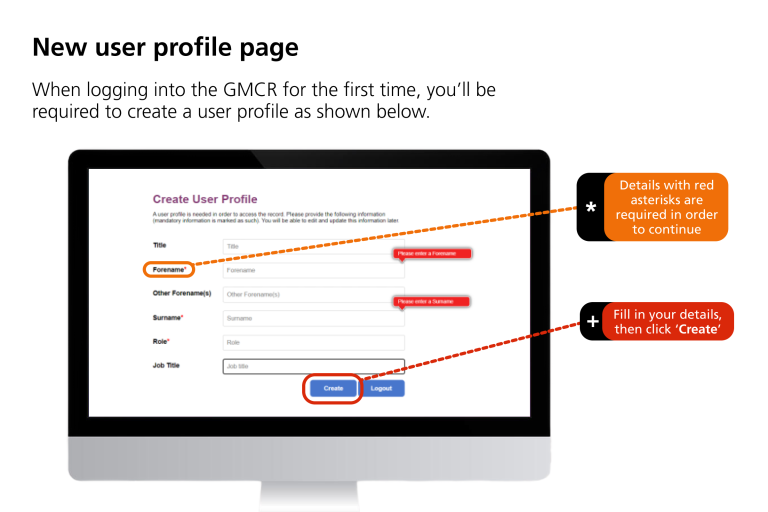
When logging into the GMCR for the first time, you’ll be required to create a user profile as shown here.
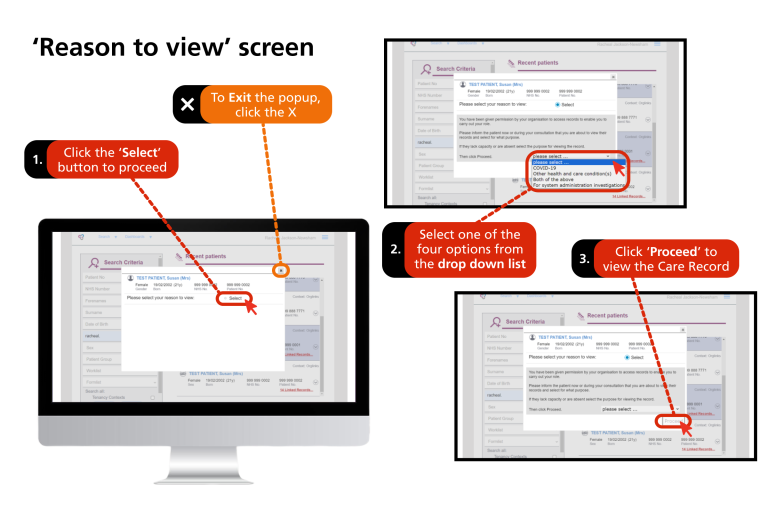
If or after you’ve created a user profile, the first thing you will see is the ‘reason to view screen’ (pictured below). Here, you will need to complete a short reason to view form every time you access the GMCR.
This will only take a few seconds and should not be regarded as consent to view. You don’t need to get patient consent to view the record. However, it’s good practice to inform patients you’re viewing their record if they are present with you. If the patient does not consent direct them to contact their GP practice.
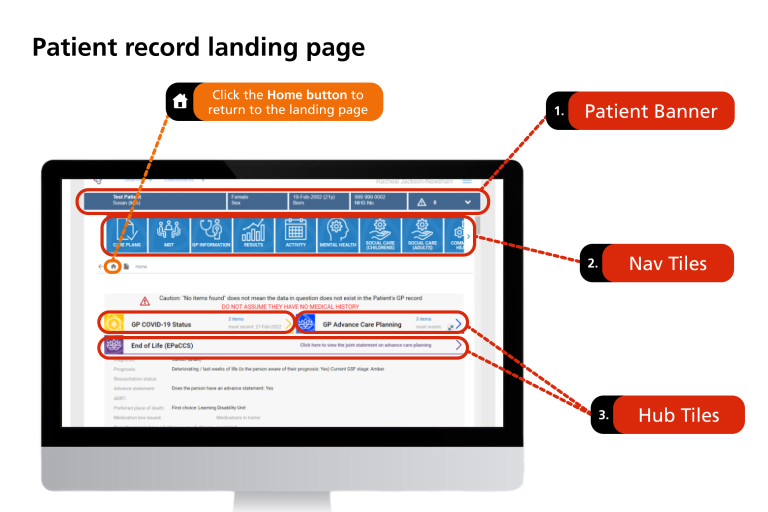
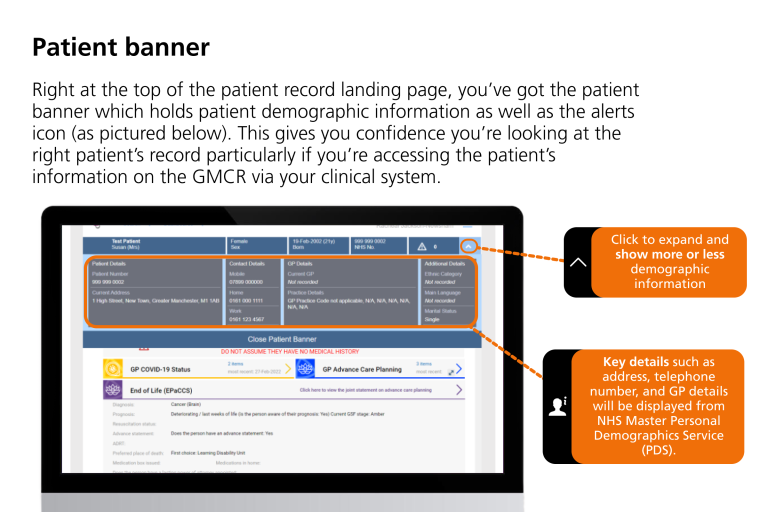
Once you’ve completed the reason-to-view form, you’ll see the Home or Patient record landing page (pictured below). This is a summary page which shows the patient’s record by using Nav and Hub Tiles to display the data for different sections of information such as Medications, Results and Activity data.
GMCR Navigation
Login to the GMCR following the steps listed above.
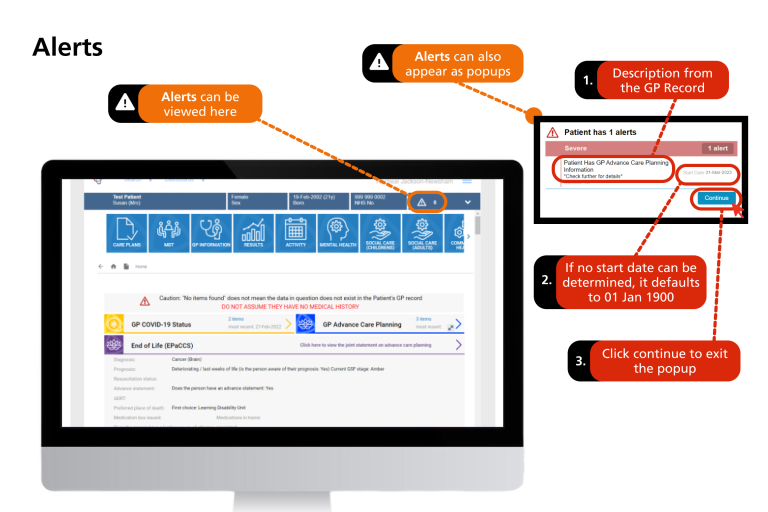
A pop-up panel for alerts will appear to display the most clinically important information. This information will be retrieved from the GP source system and will appear as a pop-up when you access the patient’s care record.
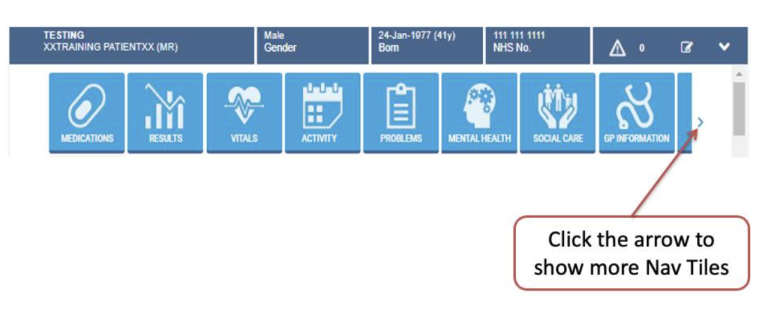
Right under the patient banner, you’ll see the Navigation (Nav) tiles. These are easy one-click routes to get the data you need, without having to scroll through the entire record. Depending on your role/permissions, you may see different nav tiles.
Data available on the GMCR
You can access all the information on the GMCR by scrolling down the patient record landing page but as stated earlier, using the navigation tiles is the quickest or easiest way of getting the data you need on the record. So to understand what data is available on the GMCR, we’ll start by looking at what data you’ll find when you click each of the 9 navigation tiles.
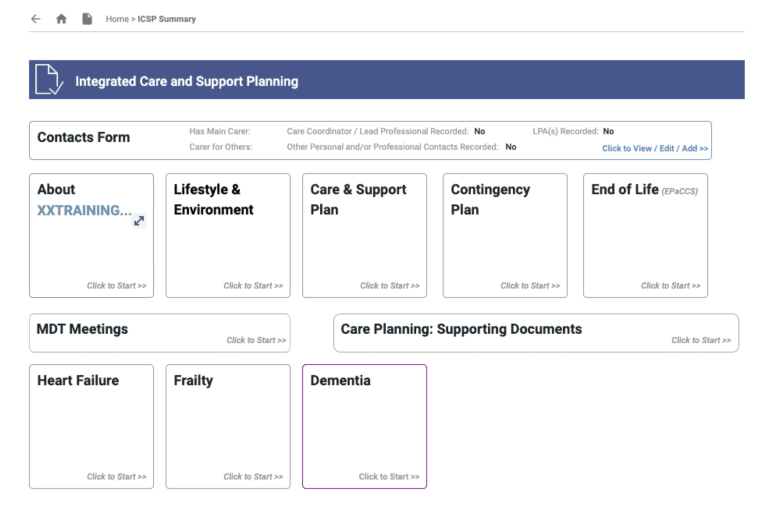
This is where all the E-forms are stored. Anyone can view the information on care plans but the ability to modify care plans would be based on your role. The image below shows the types of information or e-forms that can be viewed, created, or modified on the GMCR:
If any care plan information has been created or populated, that information would be available to view on the patient landing page but if no care plan information had been created or populated this wouldn’t be visible on the patient landing page.
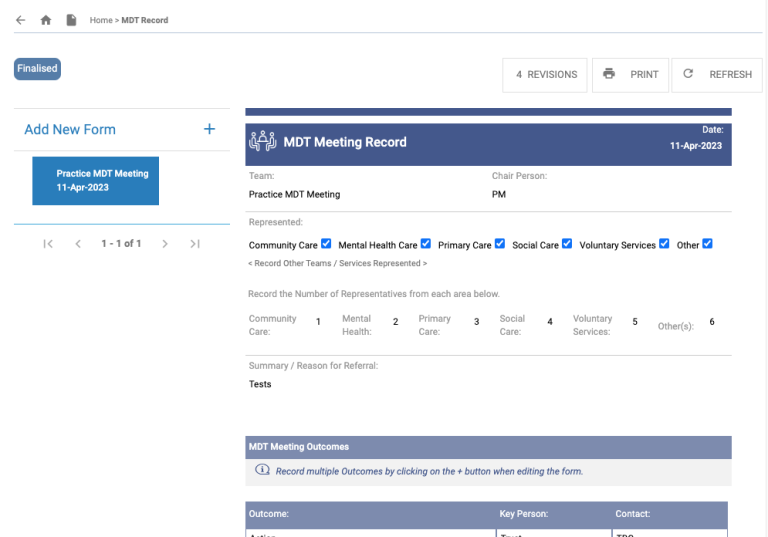
The MDT tile takes you straight to the MDT Meetings section of the Care Plans where you can view and make amends to the record depending on the kind of permission you have.
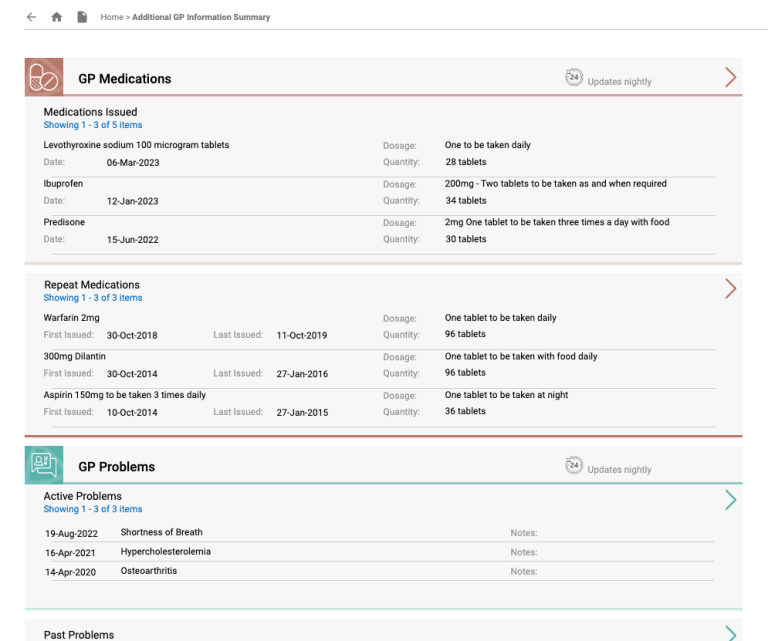
This data comes directly from GP systems (updated overnight or every 24hrs).
Some of the information you can access includes:
- Medications prescribed by the patient’s GP practice.
Summary of patient’s active and past problems as well as clinical findings
- GP Vitals & Measurements
- GP Frailty status
- GP Blood results
- GP Encounters
Other information:
- Vaccinations & Immunisations
- Contraindications
- OTC & Prophylactic Therapy
- GP family history
- Child health
- Diabetes diagnosis
- Chronic disease monitoring
- Medication Administration
- Pregnancy, Birth & Post Natal
- Contraception and HRT
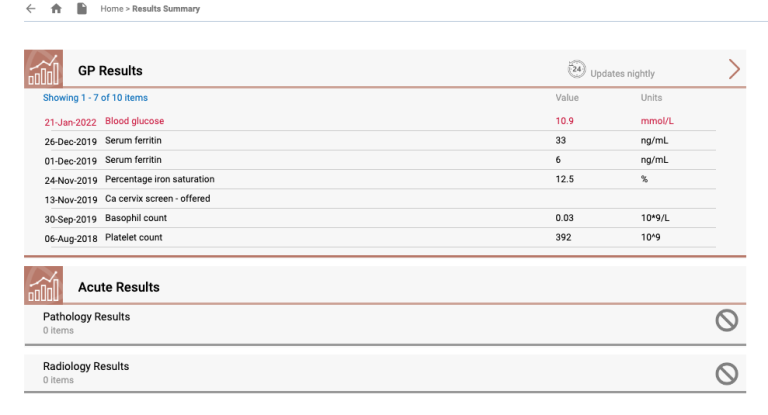
This tile provides you access to:
- GP results which hold the same information that can be viewed through the GP information tile.
- Acute results which gives you access to Pathology and Radiology results in real-time.
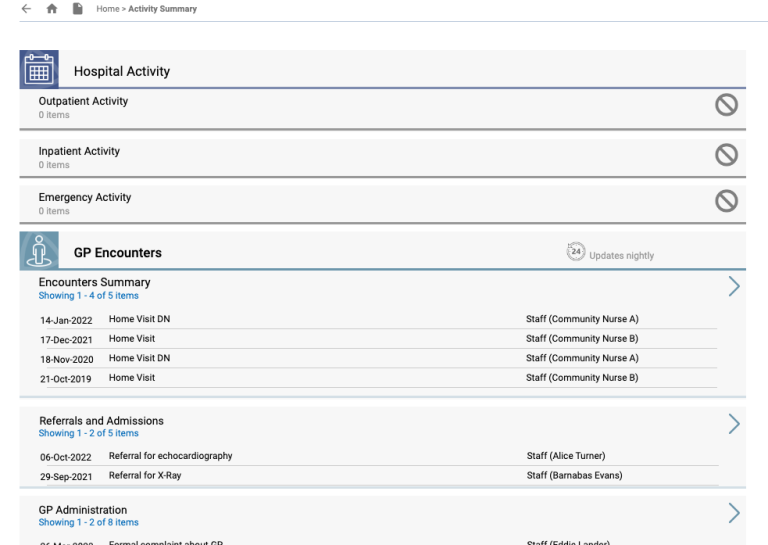
This tile gives you access to any secondary care attendances or activity including:
- Outpatient activity – All your outpatient appointments, where it was, the date and which doctor it was with and who made the referral.
- Inpatient activity – Show hospital admissions and inpatient appointments as well as ward transfers.
- Emergency activity – emergency attendance and discharges in real-time. There’s no other place where you can view all the emergency and A&E attendance (possibly in a day) in one place.
- GP encounters – same as what’s under GP Information tile
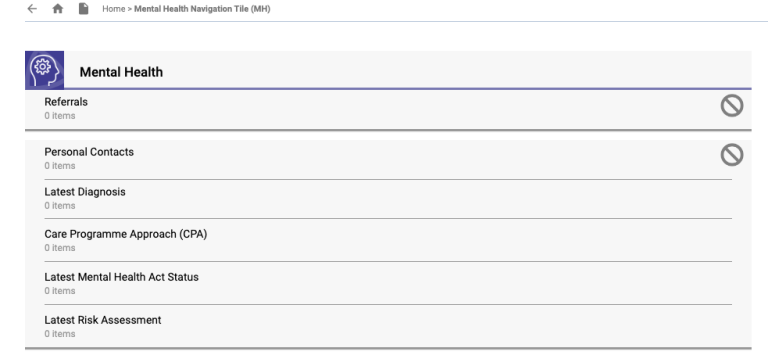
The Mental Health tile gives you access to any existing mental health information the patient has.
Some more detailed information you can find here include:
- Personal contacts (people could give different contact details to different services so it is worth checking this information)
- Confirmed diagnosis
- Care programme approach
- Mental health act
- Latest risk assessment
- Early intervention in Psychosis
- Clinical notes
The Social Care tile gives you access to social care information such as case details, case worker and family/other relationships. It does not go into much depth but provides a brief outline.
If there is no social care data for the patient on the record, you will get a notice stating so in that section of the record. However, do not assume that if no data exists in the GMCR, there isn’t one anywhere else. Please contact the relevant social care team particularly if you believe something may be missing.
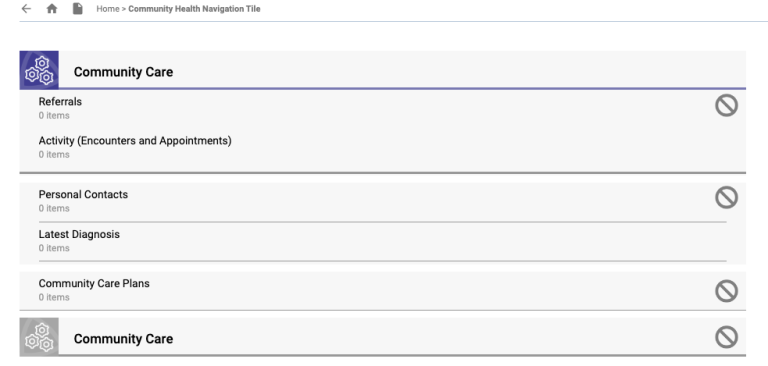
This tile gives you access to the Community Care information including:
- Open and closed referrals
- Personal contacts
- Confirmed diagnosis
- Immunisations
This tile gives you access to information regarding patients receiving treatment by The Christie (Cancer Centre)
This tile gives you access to shared clinical correspondences including Discharge Summaries
If you would like to find out more about GMCR product training and support, contact us at nhsgm.gmcrproductteam@nhs.net